The Department of Women and Child Development and Social Welfare introduced the Annapurna Bhandar Scheme 2026. This scheme gives financial power to the women of West Bengal. It replaces the old Lakhsmi Bhandar Scheme. Under this new initiative, eligible women receive a monthly cash benefit of ₹3,000 directly in their bank accounts.
The government releases the money through the Direct Benefit Transfer (DBT) system. Since millions of women applied for this benefit, tracking the applications becomes very important.
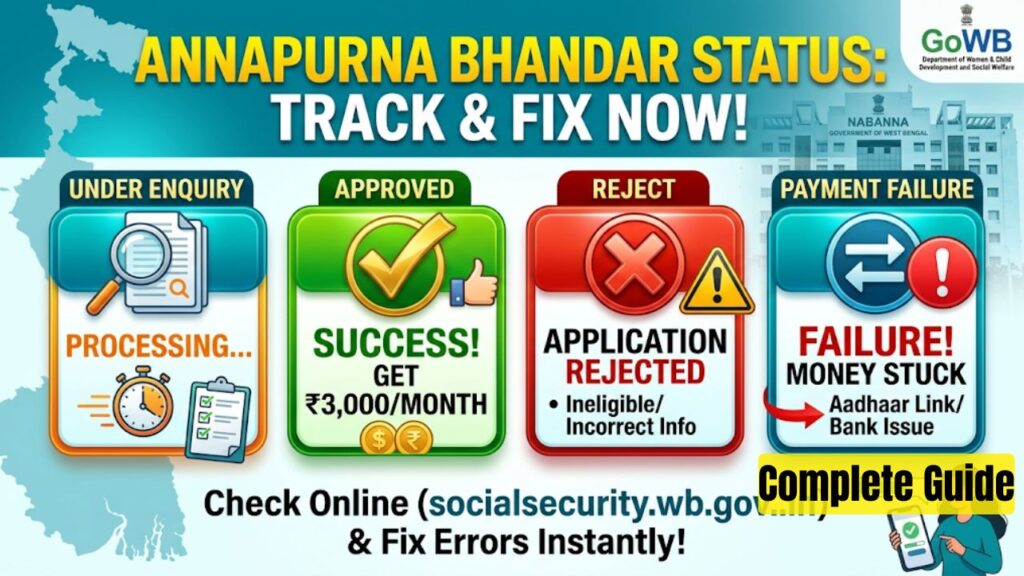
This guide helps you understand your Annapurna Bhandar status. You will learn the exact meanings of “Under Enquiry”, “Approved”, “Reject”, and “Payment Failure”. You will also find simple solutions to fix your issues and get your money on time.
Key Highlights of the Scheme
The state government tracks applications strictly to make sure only genuine citizens get the money. The table below shows the key details of the Annapurna Bhandar Scheme 2026.
| Particulars | Details |
| Name of the Scheme | Annapurna Bhandar Scheme (Annapurna Yojana) |
| State Name | West Bengal |
| Launched By | Department of Women and Child Development and Social Welfare |
| Monthly Financial Benefit | ₹3,000 per month (Paid via DBT) |
| Annual Financial Benefit | ₹36,000 per year |
| Additional Benefit | 100% Free Travel for women in state-run buses |
| Target Audience | Women between 25 and 60 years of age |
| Frequency of List Updates | Every 7 days |
| Official Application Window | 90 Days |
Important Dates for Annapurna Bhandar 2026
The government follows a strict timeline for applications and money transfers. Keep an eye on these dates to avoid missing updates.
| Event Description | Official Date |
| Official Scheme Notification | May 19, 2026 |
| Application Form Availability | May 27, 2026 |
| Scheme Live Date | June 1, 2026 |
| First Installment Released | June 3, 2026 |
| Second Installment Released | July 1, 2026 |
| Janakalyan Shibir Outreach Camps | June 15 – June 17, 2026 |
| Final Application Deadline | August 25, 2026 |
How to Check Your Annapurna Bhandar Status Online
You can track your application directly from your phone or computer. The government provides an easy method to check your current status. Follow these steps to find your status.
- Open your browser and visit the official website or the primary social registry portal.
- Look for the “Track Application” or “Check Status” option on the homepage.
- Select your district from the dropdown list.
- Enter your registered mobile number or your unique Application Reference Number.
- Click on the “Request OTP” button.
- Enter the One-Time Password (OTP) that you receive on your mobile phone.
- Click the “Verify and Continue” button.
- Your current status will appear clearly on the screen.
If you cannot access the website, you can visit your nearest Block Development Office (BDO) or Municipal Office. Bring your physical acknowledgement receipt along. The local officers will check the database and give you the latest updates.
Detailed Explanation of Application Status Meanings
When you check your status online, the portal shows specific messages. Each message indicates a different stage of your application. Read below to understand what these statuses mean and what action you need to take.
1. Status: Under Enquiry (or Pending)
This status means that the local verification officers are actively checking your documents. The verification team reviews your application details line by line. They match your physical documents with the government database.
During this stage, the Block Development Office (BDO) or Municipal officers confirm your age, residency, and tax records. They ensure you do not have a duplicate application in the system.
Action Required: You do not need to do anything immediately. This is a normal part of the process. Keep your registered mobile phone active. An officer might call you if they find minor mismatches in your spelling or address details. Check the portal again after seven days, as the government refreshes the database every week.
2. Status: Approved
This is the best status you can see on the screen. It means the verification team found all your documents correct and authentic. Your age falls perfectly within the 25 to 60 limit, and you meet every eligibility criterion. The portal adds your name to the active beneficiary list.
Action Required: No action is necessary. The state government will automatically credit ₹3,000 into your bank account during the next payment cycle. Just ensure that you keep your bank account active and do not close it.
3. Status: Reject
This status means the government has officially turned down your application. The system removes your name from the beneficiary process. The government has strict rules, and applications fail if they violate these conditions.
Common Reasons for Rejection:
- The applicant pays income tax or a family member holds a regular government job.
- The applicant receives a separate regular government pension.
- The system detects duplicate applications under the same Aadhaar card or Voter ID.
- The field verification team marks the applicant as deceased, shifted to another state, or completely absent during the physical survey.
- Serious mismatches exist between the name on the Aadhaar card and the name on the Voter ID card.
Action Required: You must identify the exact reason for rejection first. If the portal flags a small data entry error, visit your nearest Janakalyan Shibir camp or local BDO office. Bring your original Aadhaar card, Voter ID card, and active ration card. Request the officer to correct the data errors so you can reapply before the deadline.
4. Status: Payment Failure
This message means the government released your monthly ₹3,000 installment, but your bank refused the transfer. The money goes back to the government treasury. This issue does not mean your application is bad. It means your bank account has technical problems.
Common Reasons for Payment Failure:
- Your bank account is dormant or inactive because you did not use it for many months.
- You did not link your Aadhaar card to your specific bank account.
- The bank has not completed the National Payments Corporation of India (NPCI) mapping for your account.
- You provided an incorrect IFSC code or mistyped your bank account number during form submission.
Action Required: You must fix your bank details immediately to get your stuck payments. Follow the special guide below to complete your Aadhaar seeding.
How to Fix Bank Seeding and NPCI Mapping Issues
If you face a “Payment Failure” status, you must check your Aadhaar mapping status. You can do this through the official NPCI portal. Follow these steps to link your account properly.
- Go to the official NPCI website at
npci.org.in. - Locate the “Customer” tab and select the “Bharat Aadhaar Seeding Enabler (BASE)” option.
- Click on the “Aadhaar Mapped Status” button.
- Enter your 12-digit Aadhaar number and fill out the security captcha code.
- Verify the action with the OTP sent to your Aadhaar-registered mobile number.
- The screen will display the exact bank name that links to your Aadhaar for direct benefit transfers.
If the portal shows no active bank link, visit your bank branch immediately. Request the bank manager for a physical “Aadhaar Seeding Form”. Fill out the form, attach a photocopy of your Aadhaar card, and submit it. The bank will activate the NPCI mapping within 48 hours. Once activated, the government will credit your pending ₹3,000 payments in the next weekly update.
Official Government References
Always look at official portals for authentic updates. Avoid clicking on random links from unofficial websites. The table below lists the authorized links for the Annapurna Bhandar Scheme.
| Purpose | Official Portal / Reference URL |
| Primary Social Security Portal | socialsecurity.wb.gov.in |
| Social Registry West Bengal | socialregistry.wb.gov.in |
| Central Scheme Information | myscheme.gov.in |
| Aadhaar Seeding Check Portal | npci.org.in |
Official Helplines and Support
If you face continuous online errors, portal issues, or if your status does not change for a long time, use the official support options. Do not share your personal banking passwords or OTPs with anyone on call.
| Support Resource | Contact Information |
| State Government Toll-Free Helpline | 1800 2666 3666 |
| Department Office Location | Nabanna, Howrah, West Bengal |
| Local Support Hubs | Janakalyan Shibir Outreach Camps / BDO Office |
Track your status regularly, keep your bank account active with proper Aadhaar seeding, and enjoy the benefits of this flagship welfare scheme.